AI for ADHD
Let’s Fix ADHD For Knowledge Workers#
There aren’t any good accommodations for people with ADHD. Employees are stuck with egg timers at best,and employers are stuck w/o a way to help.
Let’s fix that.
Disclaimer#
ADHD presents differently in different people. What works below won’t help everyone, but holy cow is it better than the current state of the art.
Understanding Motivation#
The Fogg Behavior Model | Behavior Design Lab is wonderful for understanding what gets people to do things. Look at this wonderful graph.
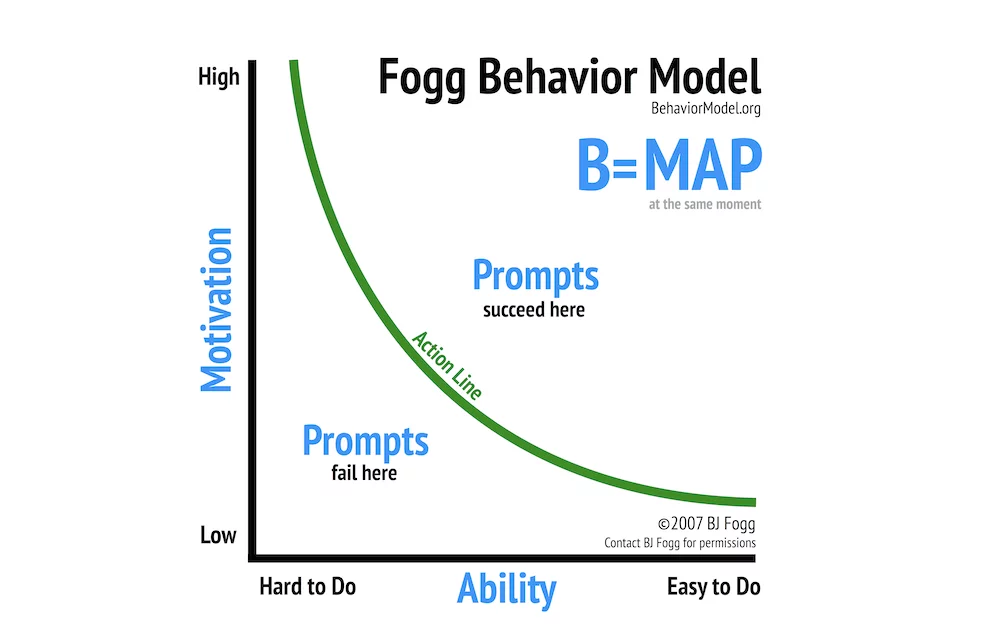
For those who haven’t attended one of BJ Fogg’s wonderful training courses (they are legitimately amazing), the idea here is that people who are really motivated can do really hard things, but the less motivation people have the less difficult tasks they can take on. We can use “prompts” to make things happen and build habits, but that is a separate topic.
One symptom of ADHD is that it makes things appear harder to do than they really are. Another symptom is fast fall off of motivation, and easily being discouraged. Basically that green line becomes artificially distorted.
A key takeaway is that ADHD isn’t a motivation problem. People with ADHD have just as much desire to get things done as anyone else. The difference is, if you tell someone with ADHD that washing their car first involves finding a bucket, mop, some dish towels, and soap, they are going to feel overwhelmed and choose to do something else. This is why organizing one’s environment is so important with ADHD. If a person with ADHD wants to regularly clean their car, they are going to keep all of the car cleaning stuff together, even if that means buying extra dish towels just to keep with a dedicated mop and bucket for car washing. Now “get ready to clean the car” becomes two steps - grab the car cleaning kit, add water.
Another example - someone with ADHD who likes to cook may choose to alphabetize their spice rack. This can dramatically reduce the mental effort to cook complicated dishes.
This is the key - minimize unneeded mental “prep work”, streamline, simplify, reduce the number of steps needed to get started on a task.
Let’s AI The Hell Out Of This#
Time to throw some local models at this.
First off, the interaction modality is always listening voice. Remove even needing to remember another hot key. Keyword activation is the name of the game.
The assistant does the following:
-
Sets timers for work/break
-
Reminds them of upcoming meetings and any prep work that is needed before hand
-
Maintains a Rolodex of people, names, jobs, etc
-
Tracks to-dos
A more advanced form:
-
Goes through email and Slack message, summarizes anything that needs attention
-
Maintains notes about particular projects or topics
Now, one by one.
Timers#
Timers are great. Timers are the #1 reason why people use Alexa. They aren’t generally monetizable in a SaSS sense, despite tons of efforts to try. They need to be easy to set, which is why everyone loves voice timers. They are a must have for any productivity solution. Pomodoro timers work really well for many people and they are easy to add, so add them.
Meeting Prep#
People manually take notes in Obsidian. Notion automatically takes notes. Zoom automatically takes notes. None of those notes are used for anything. Before every meeting the AI should gather a list of who is in the meeting, do a recap of previous interactions with those people, and prepare links to any needed documents for review. This functionality should be accessible at any time during the day. “What documents do I need to review for my meetings today?”
Rolodex#
After a meeting it should be possible to go “Hey, DesktopAI, note down that Joel is the expert on our security review process.”
2 months later - “Hey DesktopAI, who was the person I spoke to awhile back about our security reviews?”
No more going back through the calendar determining who was in a meeting 2 months ago. Ideally this would be tracked automatically based on meeting transcripts, but baby steps for now.
To-dos#
“Hey DesktopAI, add schedule a security review with Joel to my to-dos for tomorrow”.
“Hey DesktopAI, summarize my to-dos for this morning by priority.”
“Hey DesktopAI, go through my Slack channels and find anything needing my immediate attention within the next 2 hours, summarize, and add to my to-dos.”
“Hey DesktopAI, I scheduled that review with Joel, mark it as done.”
Integrate with Linear/Jira as desired.
Slack/Email integrations#
Remember when Gmail used to do this, like a decade ago? Wow it was nice.
Again, simple enough. There is so much garbage in my inboxes, let me know what actually needs my attention.
Topic Notes#
In the post Useful Corporate Agents I discuss how this should work in depth. The short of it is, there should be a way to have notes on a per topic basis that can be referenced. This keeps life organized in a meaningful way.
“Hey DesktopAI, add a note to the front-end rework project that we need to decide on a CSS framework.”
“Hey DesktopAI, for the vendor contracting process, add a note that Xyzg systems is in the running now.”
It should be trivial to pull up all notes about a project. Bonus points if transcriptions from meetings about a project are all automatically summarized and pulled in as well.
A Recap Of What We’ve Fixed#
Getting ready for a meeting -
Before: Open up the invite, look at who is in it, go through description for any needed docs. Go through previous meeting notes to see what was discussed last time. Check manual rolodex to remember who everyone is and what their specialty is.
After: You are presented with a list of docs to review, a summary of all previous related meetings, and a brief description of everyone who will be attending. Steps reduced down to just reviewing linked docs.
Staying Focused At Work -
Before - Manually start a pomodoro timer up on the computer. First install the app, then remember what it is called. After rebooting, find it again.
After - No need to remember an app name, just say start a timer. Again, this sounds simple, but the absurd usage #s behind Alexa timers tells a different story.
Before - Manually write everything down on a to-do list and keep portions of it in sync with your workplace’s Linear/Jira board (as needed), and other portions to yourself (emails to write, meetings to schedule, etc)
After - A list is maintained for you, always accessible, always available, and items can be added w/o interrupting flow.
Finding a Subject Matter Expert
Before - Go through meeting notes manually trying to remember who it was you chatted to a month or two ago
After - Just ask your AI.
How To Build It#
SaSS or non-SaSS? Locally hosted or not? Macs with 24GB+ of RAM can do all of this with the latest Gemma 4 models running locally. TTS models are now under 1GB of VRAM, pick your favorite STT (ASR) model.
Cloud based, hook this all up to your favorite provider. I’d still do local TTS to save yourself a ton of money (the CPU only models run just fine now days), but feel free to use whatever -nano variant you want of a cloud based LLM. None of the above requires anything remotely resembling a frontier model.
Build It, Then What?#
Then you get it certified as an accommodation for people with ADHD and you sell it to employers, preferably through insurance companies. Since you’ll have the entire market to yourself, enjoy massive profits.